Showing posts with label Demantra - DM. Show all posts

Saturday, March 5, 2016

Demantra 12.2.5.1 New Features

Oracle released Demantra 12.2.5.1 some time back and there is already a patch on top of the first release which is mandatory for 12.2.5.x customers. With this release though Oracle has brought in couple of interesting enhancements to Demantra and OOTB integration. Here is a summary of what's new per in Demand Management module, no other modules have any additional features in this release.

  • Site level integration with EBS enhanced: EBS-DM integration enhanced to allow clients collect historical sales into Demantra from EBS Order Management at account or customer level of Site hierarchy. This used to be a typical customization at client locations and with this option surely customers with EBS integration implementing Demantra or looking for upgrades will be able to leverage this OOTB feature now. Implementing this option will also take care of concerns in later upgrades/patches to EBS side as this becomes a supported option.
  • Improved Security: Earlier releases used HTTP calls to communicate between modeler/engine/application server mainly, also allowed a user within firewall to launch engine or other calls if they had the right URL. Calling methodology now uses database layer & oracle wallet to improve security. 
  • Enhanced Workflow Tool: Few small but handy changes like SAVE AS option to copy a workflow definition & ability to view(no changes allowed if not an owner) workflow definition owned by other users. Additionally an importance enhancement to allow indicating in workflow step, from which step workflow should restart in case of failures. This surely adds to recovery ability of workflows.
  • Global instance enhanced timezone support: User's timezone will be considered in worksheets or any other user actions like simulation launch. E.g. history and first forecast bucket will transition based of user's timezone and not based of instance system timezone.
  • Intermittent flag to IO: Inventory Optimization module now gets an intermittency indicator along with Forecast and forecast accuracy which it leverages to improve Safety stock & Service level. 
  • Mobility Support enhanced: Demantra Anywhere now supports most regular worksheet functionality, additionally users can launch methods, run simulations, and introduce new products. 
  • GUI: Improved GUI for better user experience. New release also allows selecting a pre 7.3.1.4 UI or revised 7.3.1.4 UI or latest 12.2.5.1 interface. 

Sunday, January 18, 2015

Demantra Engine Log - Understanding Node


Demantra's Engine2K log has lot of details and one can configure to generate log at various level to debug/analyze engine's forecast generation process. Here is a quick visual of what various numbers mean when log line says Forecasting[x,y,z].


Tuesday, July 30, 2013

Oracle's Demantra 12.2.1 released !


Oracle last month released 12.2.1 version of Demantra. This version was long over due for release and it finally is available for all customers. One can download the new version from Oracle's E-Delivery.


Though be careful, as this version can either be installed as stand alone or it can be installed along with VCP 12.2.1 version only. For using the VCP/EBS - Demantra standard integration, one has to be a 12.2.1 version of VCP.

One of the key feature of this release is having the ability to utilize both weekly and Gregorian calendars in one data model itself.


Thursday, September 20, 2012

New "Guided Resolution" for Demantra

After a good success of Oracle Community concept released earlier by Oracle Support, we are seeing them taking another step forward in form of "Guided Resolution" for Demantra application. The concept basically better organizes previous resolutions for known or fixed issues related to Demantra product. 

They have started with five topics:
  • Data loading related issues (Note Id 1461899.1)
  • Data loading issues not related to error codes (Note Id  1468884.1)
  • Workflow related issues (Note Id 1353217.l)
  • Worksheet related issues (Note Id 1486639.1)
  • Engine related issues (Note Id 1486634.1)
Guided resolution page look:


Refer to below note for more details around what is this new concept and how to use it. 

How to Use the Demantra Guided Resolution, a Proactive Services Tutorial.  Note 1473992.1

Sunday, July 8, 2012

Demantra: Engine Status Check


Checking status of Engine:

To determine if engine is running or not, one can use the work_status parameter in init_params_0 table. Value_float column indicates if the current or the last engine run was in batch mode or simulation mode.

  • 99 => Simulation Run
  • 1=> Batch Run

Value_date reflects the current state of engine. If the value_date changes every 22 sec then it would mean that Engine is running currently.

As Engine can only run in one mode at a time, it helps to be aware of the current state of engine prior to launching engine run.

Sunday, June 3, 2012

Demantra 7.3.1.3 version released

Demantra 7.3.1.3 version was released recently for customers.

Following are few key new features:
 - Integration with Asset Intensive Planning Applications.

  • DM module is now integrated with cMRO(Complex Maintenance Repair & Overhaul) module of Oracle EBS application. Integration empowers using Demantra's capabilities to build non-unit maintenance plan forecast and to support deriving planning factors accurately for cMRO module. 
  • DM module is also integrated with eAM(Enterprise Asset Management) module of Oracle EBS application. The integration let's Demantra users to generate a non-maintenance forecast and then use it further with ASCP and cMRO to support planning for maintenance activities.
 - Ability to define Series with Hyperlink, allowing opening a URL from worksheet.

- Ability to run database health check using standard procedures. Flexibility to run a quick or a comprehensive test has been provided.

- Additional improvements on PTP/TPMO engine are also part of this release.

Refer to document ID 1453644.1 on Metalink for more details about this new release. 

Monday, June 6, 2011

Integrated Causal Exponential Model (BWint)

Demantra has Integrated Causal Exponential Model (BWint) as one of the models available for analytical engine. This also is a regression model, known as Multiplicative regression - winter model. The model works only in DP mode. It runs multiplicative regression on Causal data (short CFs) and then smooths out the residual series exponentially like HOLT.

Data Type: Good fit for capturing Trends, Seasonality and Causality in demand data.

Example: Here is an example of where forecast is generated by Bwint model of Demantra. Look at how engine is able to capture seasonality and demand trend accurately, providing a good baseline forecast for planners to start with.

Tuesday, March 2, 2010

Understanding Forecast Bias


What is bias ?
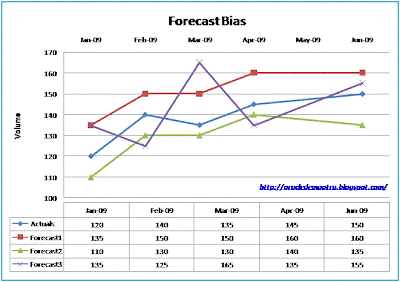
If you observe forecast error going in one direction or other, then you have a forecast which is possibly biased. In the example below try to observe the bias and see if you are able to find the forecast versions with bias.

As you would have pointed out already following is the observation on above example:
  1. Forecast1 has a positive forecast bias
  2. Forecast2 has a negative forecast bias
  3. Forecast3 has mixed bias and the cumulative bias in such case could be insignificant

Decision on whether a forecast is biased or not can be made by reviewing the forecast error as well, study the example below.

Why it exists?
As final forecast is combination of statistical forecast and manual intelligent updates, the bias can slide into Final forecast through any of the mentioned input gateways. While statistical forecast bias are normally specific to items(local bias), bias building up due of manual intervention usually has impact on all the items(global bias).

Manual updates done by forecasters/demand planners at times lead to building of a biased forecast. These updates are driven by various factors like:
- Increasing forecast to match up with volume targets
- Optimistic or pessimistic approach towards forecasting
- Expecting Promotional incremental sales volume
This kind of bias usually has impact on all the items.

Bias found in statistical forecast is most of the times under-forecasting or over-forecasting situation for a specific item-location combination. Few of the cases which lead to such observation can be list as:
- Under-forecasting for complete future horizon due of recent months sales volume showing a down trend.
- A persistent trend in sales volume
Such forecast bias is normally particular to an item or an item-customer combination.

Getting rid of Bias?
Bias shall be removed from forecast as it can assist in improving your forecast accuracy, which eventually reflects across supply chain health. An overall reduction on forecast across all items can take out the global bias(e.g. 15% decrement on forecast numbers all across). For bias which is specific to item, one needs to identify and fix them for every incident by adjusting the forecast.

Thursday, January 21, 2010

Model codes used in MDP_MATRIX

Here is a list of the coding convention used by Demantra, when populating MDP_MATRIX with information about which models were used(column MODEL) and which weren't.(column DELMODEL)

H Holt
J Regression FOR Intermittent
K Multiplicative Monte Carlo Regression FOR Intermittent (ICMRegr)
L Transformation Model (log)
R Regression
E Combined Transformation Model (elog)
C Multiplicative Monte Carlo Regression (CMReg)*
B Integrated Causal Exponential Model (BWint)
F Croston For Intermittent
G Logistic*
A ARLogistic*
X Auto and Linear Regression (ARX)
V Integrated Auto and Linear Regression (ARIX)*
D DailyMultiplicativeRegression*

T Naive Holt
N Naive (if all models failed, a moving average forecast is generated)
NULL No forecast attempt made on this combination.
M Modified Ridge Regression*
NONE Combination remains non forecasted yet, not processed by engine.

E.g. MODEL column has value BFR for a combination, this means engine used models B, F and R to generate Bayesian combined model forecast.

Detailed information about models and parameters is available in Demantra implementation guide.
Refer to "My Oracle Support"
Oracle Demantra Documentation Library [ID 443969.1]

Wednesday, September 30, 2009

Demand Management Process & Demantra’s Solution

Sensing Demand

Demand data should be collected from various possible sources and which can be treated as “BIBLE” for basing your forecast on. Not only actual sales data but other attributes of sales data like promotional causals, holidays, events etc. should be brought in, which justify the variations in demand data. E.g. Sales data collected from various Retailers’ store varies with days on which store is open, promotions which were launched at the store and competition activities near store’s location. So while predicting sales at these stores we should consider all these factors as well.

Demantra implementation offer real-time Demand sensing capabilities, collect demand data and information from various sources like sales orders, shipments, POS data, distribution center data, customer data and marketing data. Demand can be collected inside Demantra on daily or weekly basis as per the requirements.

Shaping Demand

There are items & locations for which sometime sales data is not available, in that case Demand Planners based on their instincts & experience should be able to enter or edit the sales history. Not only history of sales but forecast numbers generated by engine is likely to be edited to consider inputs which have not been captured by the Analytical Engine.


Oracle Demantra Demand Management provides user ability to define override series for each of collected series and also for forecast series. Demantra provides flexibility to create unlimited number of Causal Factors to capture the information which can describe the demand variance and events which occurred. Causal Factors are created and used to ensure that impacts of these factors are taken into consideration by Engine to generate the Forecast numbers.


Collaboration

For any organization the problem of keeping all the stakeholders who represent various verticals like Manufacturing, Marketing, Sales, Retailers, etc. is very common. Today most of the firms are into global markets and have operations and sales happening in various corners of world. Also to become a demand driven supply chain network, the need of having collaboration with all the demand nodes (e.g., customer’s stores) and supply nodes (e.g., raw material supplier’s factory) becomes vital for most of the industries.

The Demantra application provides an easy to use tool for collaborating with all the stake holders using a web based platform. Users can easily collaborate with their internal stakeholders & customers to better predict their forecast. Also all the stakeholders can be informed and kept in loop to reach to final Consensus Forecast number.


Alerts, Exceptions & Notifications

In most of industrial scenarios it becomes difficult to analyze and to figure out the issues like Demand plan crossing the budget limits, import data failures etc. Thus the automated notifications can assist the planners and managers to take up remedy actions. Alerts can be created within Demantra for notifying stakeholders and concerned group of users on Real-time basis. Automated workflows keep all the users notified and updated if there are any exceptions meeting defined conditions.

Wednesday, June 3, 2009

Notes from Today's Webcast on "The Key to Optimizing Demantra Worksheet Performance"

Today's webcast was another session full of information on how to ensure that you are getting best performance from Demantra worksheets. Few key points to take away were:

1. At times JAVA is the culprit for a degraded performance of worksheets
2. End users machine specific setups can help improve performance as well
3. Database maintenance plays key role too
4. Application server settings based on number of concurrent users comes handy too.

The session covered various issues and resolutions for them, it was nicely presented by dividing in short term and long term solutions.

Short term solutions which were discussed in today's session focused on:
- Ensuring End user machines meet minimal system requirements
- Setting up the heap size (Xmx) to maximum possible
- Guidelines to end users for minimizing other applications run during Demantra usage
- Worksheets shall be reviewed and usage of filters is highly recommended
- Setting up params related to Application Server (like MaxUpdateThreads, etc.)
- Running Rebuild_Schema procs to ensure no chain rows exist
- Running Drop_temp to ensure temporary tables aren't eating up space

In long term strategy, few key suggestions were:
- Ensuring strong network connection for end users
- Providing separate tablespace for key tables and their indexes (e.g. sales_data, mdp_matrix etc.)

For complete session coverage and details of all the solutions, you can go to Oracle Community - Demantra Solutions. (or refer to metalink note 800030.1)

Wednesday, May 27, 2009

Upcoming Demantra Webcast from Oracle

Another solution advisory webcast will be happening on 3rd June 09, this webcast comes again from newly build Oracle Support Community for Demantra Solutions. The subject for this webcast is "Optimizing worksheet Performance", more details for the webcast can be found under metalink note with document ID 801835.1. 

"Upcoming Demantra Solutions Advisor Webcasts

Advisor Webcasts offer a convenient way for you to interact with professional, technical, and application experts regarding topics such as troubleshooting tips, best practices, new release information and more.

Webcast: The Key to Optimizing Demantra Worksheet Performance

Topics will include:
  • Java Plugin Settings
  • Creating Worksheets in the optimal manner
  • Backend Database Checks
  • Application Server Settings
  • Other options when your worksheet performance doesn't meet your needs

A short, live demonstration and question and answer period will be included. " 

You can register for this webcast from the link provided in the metalink note. (Id provided at the beginning of this post).

Thursday, May 14, 2009

Forecasting Basics: Qualitative Approach

Not always you as a Demand Planner have luxury of sitting on top of good amount of historical data for predicting demand of various products. For new products being introduced into the market and other scenarios when data available isn't sufficient, then one needs to utilize their judgement and intuition. This can be best addressed by using collective expert opinions in making forecasts and the process is called "Qualitative method" in forecasting. 

"Qualitative Techniques"Definition: "Estimating method that relies on expert human judgment combined with a rating scale, instead of on hard (measurable and verifiable) data."

Few known methods used are:
1. Expert Inputs
Sales, Marketing and Management folks bring expertise opinion towards making accurate forecast predictions. Even with quantitative forecast in place, Expert inputs can modify and adjust forecast numbers to improve it's accuracy. 

2. Delphi method
Experts anonymously answer a questionnaire, which is later revisited to review the responses. The process provides flexibility of revising their earlier answers based on the feed backs. This process leads to answers converging on every round and every time improving the accuracy. 

3. Analogy/Attribute/Assumption based Forecasting
Forecast based on analogy to similar products. 

4. Market Research
Creating forecast based on market &  sales analysis along with Consumer research on   products.

More reading material @
1. Forecasting Techniques, Part 2: Qualitative Methods
2. Measuring Forecast Accuracy : A Tutorial :  Qualitative Methods


Saturday, December 13, 2008

Demantra: Analyical Engine - A deeper look - Part2

Analytical Engine's Demand planning(DP) mode run comprises of Prepossessing stage, followed by model application & testing stage. In Promotion Effectiveness(PE) mode run of engine, various promotional CFs are prepared and used before Forecast phase starts. 


Forecast Phase of Engine Run:

Pre-processing Stage:

1. Treatment of missing values.

2. Detection of intermittency.

3. Preliminary outlier and regime change detection.

4. Removal of obvious (gross) outliers.

5. Data transformation for use in specific models.


Model application & Testing Stage:

1. Checking that the number of data points exceeds at least by two the number of causal factors. This is done to ensure that, No over-fitting occurs and coefficients for all causal factors can be determined.

2. Estimation. Statistical algorithms, are implemented to data and their parameters are calculated.

3. Fit and Residuals calculation. Fit is calculated by applying an estimated model to the historical period. It reflects the ability of the model to reproduce the actual series. The deviation of fit from the actual forms the residual series. The variance of residual, along with complexity (number of estimated parameters) is utilized to compute the weights for model averaging.

4. To check the ability of a model to mimic the actual series, a Fit validation is performed, provided the nableFitValidation flag is on.In Fit validation the residuals undergo a battery of statistical tests.Forecast performs identical calculation to Fit, only for the future period, lead.

5. To perform Forecast validation, both the parameter EnableForecastValidation and the variable ValidFit have to be “True”. This is because if a model reached this stage with invalid fit, it must be running at the highest forecast level, and at this level forecast validation is disabled, allowing a somewhat more liberal treatment of models. In Forecast validation models undergo three tests:

• A test for an unusual zigzag-type jump


more details on Demantra's Engine can be found in Oracle Metalink's Documentation library for Demantra.


Tuesday, December 9, 2008

Demantra: Analytical Engine - A deeper look - Part1

Through this post, I would like to share some of findings about how Demantra's analytical engine works. The post is based on Demantra's documents created by Oracle and are available in Oracle Metalink for a detailed study. 

 What is Forecasting


Forecasting empowers one to predict the futuristic tendencies of supply chain, influenced by seasonal and other predictable factors. The result of forecast is a projected curve that has been smoothed to show tendencies and de-emphasize the exceptional variations.


Demantra engine is capable of multidimensional forecasting with mixed modeling techniques. It has been designed to be robust enough for handling large scale installations. It is capable of modeling hundreds of thousands of data sets with various data patterns.


Modeling is performed according to forecast tree, in which each node in the tree is defined by an item-location combination in the Enterprise Data model. Engine tries to generate forecast at lowest level of item-location combination, but in situations where due of data insufficiency's , it is unable to generate a good forecast, then it traverses the Forecast tree to higher level for generation of forecast at an aggregated level. Forecast generated at higher level is split down to lowest level, using a splitting mechanism called “proport”.


Batch verses Simulation


Engine can be executed in two modes, Batch or Simulation.


Batch Run:

  • Traverses a large forecast tress, described in database. Each node in tress represents a time based data series that is subjected to forecast.

  • Performs model calculation on a large subset of data series (each node of forecast tree)

  • Writes the processed data series to a new forecast table in database.

  • Executes a post-process procedure which updates new forecast table


Simulation Run:

  • Same steps as above are performed but on a selective subset of data, as chosen by user for “what-if” kind of simulation run.


    Engine Components


    Engine consists to two components, Engine manager and Engine server. There is one instance of Engine manager and one or more instances of engine server. The engine server scans a portion of the forecast tree according to the traversal rules, and sends the output to the split mechanism. 
    The engine server receives IDs of tasks from Engine manager, which divides the forecast tree into sub-trees (tasks). The engine manager is responsible for the engine run as a whole. 


    Based on Engine settings done via Engine Administrator application, Engine managers tries to initiate an engine server on list of machines on network having engine registered and server component installed.


    Reference “Details of Engine Manager & Server”. (source: Oracle Demantra Engine Guide v.5.2.6)


    Causal Factors


    Factors which cause the deviation from a trend, are known as Causal Factors. E.g. a sales promotion, due of it’s result you expect sales to rise. On the other hand, a sales promotion by your competitor can impact your sales negatively, which also becomes a causal factor.


    Causal factors such as promotions, marketing campaigns and production stoppages are essential components when analyzing demand pattern.


    Global Causal Factors effect all the nodes of forecast tree, seasonal CFs are normally global.


    Local CFs can be different for each item-location combination.


    Event is another word for CF, it can be loaded easily with Code, value and intensity information. Event information is not necessarily required to be loaded in future.


    ............to be continued.


Sunday, November 16, 2008

How is "Demantra different from ODP" ?

Oracle has left behind ODP and have Demantra as ther future demand planning & forecasting application. Demantra has already found it's place in Oracle's roadmap for Fusion. Demantra had many major differentiators on ODP, that it made Oracle's job of selling Demantra as substitute for ODP, a lot easier. Demantra's beysian mix modeling technique, it's flexible & scalable nature, and support for functions like, S&OP, PTP and TPMO are among few of these differentiators. 

ODP's best fit forecasting method had the capability of selecting the most fit model, for forecast calculation for a data series. It used one of all the available models, which had least residual and was a closest fit to historical demand data. While in Demantra, engine selects multiple good fit models and puts a coefficient to each of their predictions, to calculate the final baseline forecast. So Demantra calculates fit for multiple models to historical demand, and then tries to validate the fit. In the forecasting process, based on residual calculations it also calculates weightages for each of those models and then all of those are combined to form a combined mix estimator model. The Beysian modeling hence uses multiple models, instead of one best fit, which ensures that a better statistical forecast is generated.


Demantra's BPM(Business Process Mapping) capabilities ensures it a berth in Oracle's Fusion and future product roadmap. Demantra's footprint in Trade promotions management & optimization business solutions, along with it's Deduction & Settlement Management modules, makes it a better bundled suite of solutions. 

Wednesday, October 29, 2008

Demantra Forecasting Models- Part2

continued from Part-1 of Models for DM module ...

6. Combined Transformation Model(elog): Works in both DP & PE mode of analytical engine run and is combination of Transformation &  CMReg model. This model performs CMReg operations on log transformed time series. 

7. Multiplicative Monte Carlo Regression(CMReg): This model comes into picture for both DP &PE mode run as well, and utilizes long Causal Factors. 

8. Integrated Causal Exponential Model(BWint): This also is a regression model, known as Multiplicative regression - winter model.  The model works only in DP mode. It runs multiplicative regression on Causal data (short CFs) and then smooths out the residual series exponentially like HOLT. It helps modeling Trends, Seasonality and Causality in demand data. 

9. Auto & Linear Regression: It is available in DP mode run and includes auto-regression. Causal factors which are used by this model are Constant & events. 

NOTE: All the 15 models can be used by engine in DP mode run, while in PE mode following models are not available:
- ARIX, ARLOGISTIC, ARX, BWINT, FCROST, ICMERGR & IREGR

Thursday, July 17, 2008

Oracle Demantra: Seeded EBS-DM integration data flow

Oracle's seeded Demantra integration with Demantra's Demand Management module can be utilized with ease to empower an organization with a collaborative, web based, integrated demand planning environment.

In EBS-DM integrated environment, one can start the process of demand planning, with responsibility "Demand Management System Administrator" .

The process starts with Collection of master/transactional data (item, location & sales) from EBS and ends with publishing back consensus forecast to Oracle supply chain planning application. Demand Administrator logs into the Demantra responsibility and starts the Collection program, downloads the master and historical data into Demantra application using seeded workflows, kicks off a workflow to execute the analytical engine in batch mode, makes manual adjustments/overrides on forecast with information like causal factors and promotions and finally runs another workflow to upload the forecast back into APS/MRP.

Demand planning using Demantra Demand Management application compromises of following high level process steps:

  • Collection of Dimensional, historical, pricing, costing and other reference data
  • Validate & Modify data
  • Generate Baseline Forecast
  • Consolidate Baseline, Simulation and manual forecasts
  • Upload Final Forecast to ASCP/SNO/IO/MRP
  • Archive Monthly Forecast

Thursday, May 1, 2008

Statistical Process Control : Using Demantra

Forecast being the base of any demand planning and further supply scheduling processes, needs a mechanism to have a control on the process of predicting forecast. This can be achieved by utilizing the functionality of your demand planning tool to monitor forecasting process.The need of adjusting tool’s parameters to create quantitatively more accurate forecast is always there, but besides that a Demand Analyst need to capture all those SKUs for which the forecast being generated is not healthy enough.
Statistical Process Control: A tool to monitor forecasting process, identifying those SKUs whose forecast error is going out of set of limits and those whose error are under control.
Benefits: Reduces time required by Analysts for forecast analysis and lets him focus on area of concern instead of wandering through all the SKUs.
Set Performance indicators like health signals for forecast and define alerts/exception raising conditions, say:
Forecast Accuracy <>
95% <> 95% Medium Level AlertAutomated Alerts/
Exceptions: Create setup for invoking alerts/exceptions automatically as and when required during the demand planning cycle. Ex. Raising alerts just after forecasting engine completes batch run, raising alerts after final forecast is approved, and so on.
Notifications: Configure your tool to send automated notifications to concerned business users to keep them updated with what chunk of data they should be analyzing for resolving the raised alerts.
Here is an example of how the same can be achieved by using Oracle’s Demantra application:
Customization Required:
Option1:- Create Exception worksheets with all the SKUs data in it, with Forecast accuracy related series- Put exception condition & Save worksheet definition- Create a workflow with exception step which can be launched by analyst using a Level method from worksheet or directly from Workflow manager page. - Send alerts to Analyst for any exceptions found
Option2:- Create Exception worksheets with all the SKUs data in it, with Forecast accuracy related series- Put required exception conditions- Write custom code to call up run workflow at end of every forecasting cycle.- Send alerts to Analyst for any exceptions found by calling these custom codes

Perspectives on Managing through Difficult Times